
For official game communities
Your characters, saying your players’ words.
Reaction GIFs of your characters, and gameplay clips turned into GIFs with your official border, for your official Discord server. Built from your own art. No AI-generated images.
Want to try the standard styles first? You can add Fragmingo to a server.
Type any words
/fragmingo text:LET'S GO!and your character says it in a GIF.
Turn clips into GIFs
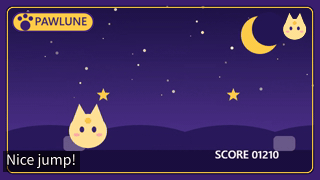
On a gameplay clip (up to 30 s), open Apps → Image / Video to GIF and pick a start point (the beginning, or 1, 2, 3 or 5 s in). Fragmingo turns up to 5 seconds from that point into a GIF in your official frame.
Only in your server
Your style and frame can only be used in your server. Your server admins choose the channels, the posting mode and a daily limit.
Samples use PAWLUNE, a fictional game made for this page. It is not a real title or a client deployment.
How it looks in Discord
Members use one command. The GIF is posted in the channel with their name on it (you can also require the creator to preview it first).
# reactions
Illustration of a channel (the game and the member are fictional).
A dedicated style for your game
We build the style from your characters and logo. Members type any words they like (up to 80 characters), in English or Japanese.
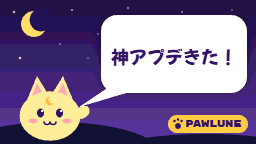
PAWLUNE is a fictional game made up for this sample, not a real title or a client deployment. A dedicated style works only in the server it is set up for; it never appears in other servers or in Fragmingo’s style list.
An official frame for gameplay clips
Players can turn gameplay clips they post in Discord (up to 30 s) into GIFs with your official frame, from the clip’s Apps → Image / Video to GIF. Each GIF covers up to 5 seconds, starting at the beginning or 1, 2, 3 or 5 seconds into the clip. The frame is available only in your server.

The gameplay clip is an animation made for this sample. The GIF was made with the same video-to-GIF conversion used in production (watermark off for this website sample).
Settings for community managers
Community managers with the Manage Server permission set these with /frag settings.
- Posting mode
- Direct post, Preview required (the creator checks it privately before posting), Download only, or Disabled.
- Channels
- Allow Fragmingo in chosen channels or block it in others. You can limit it to one channel.
- Generation limit
- A daily limit for the server. Plan limits also apply.
Community managers should confirm which images can be used and explain the permitted uses to members.
Using Fragmingo in DiscordOne title, one server, 90 days
Get in touch to discuss a trial in your official community. Tell us about the game, the Discord server, the assets you want to use, and your planned activity.
Before starting, we will agree on fees, permitted asset uses, generation limits, support, reporting, and how to continue or stop at the end of the pilot.
Discuss a 90-day pilotUsage reporting
During the pilot, Fragmingo will manually compile reports on successful generations and the number of users in the selected server. We will agree on the reporting period and frequency before starting.
Successful generations include private previews. This is a different measure from the number of publicly posted UGC items.